Tampilkan postingan dengan label Scratch. Tampilkan semua postingan

Rabu, 27 Desember 2017

Cara menambahkan suara di Scratch


   Assalamualaikum guys... kali ini aku akan menunjukkan cara menambahkan suara di Scratch,
Let's make it


Step 1: Klik tombol "Sound" di bagian atas


Step 2: kalian bisa mengambil lebih banyak lagi suara di gambar pengeras suara


Step 3: Atau kalian bisa juga merecord suara kalian dengan memencet tombol mik


Step 4: Atau bisa juga mengambil dari komputer kalian dengan memencet gambar folder


Step 5: Setelah selesai mengambil suara ikuti script dibawah ini untuk mengeluarkan suara


Nah suaranya sudah keluar, sielamat mencoba!!.

Cara membuat game Hide And Seek di Scratch


    Assalamualaikum guys.... kali ini aku akan menjelaskan cara membuat game Hide And Seek atau
petak umpet, let's make it!.


Step 1: Buka Scratchnya


Step 2: Kecilkan gambar kucing yang ada di tengah


Step 3: Buat Variable lalu beri nama poin


Step 4: Lalu buat script seperti dibawah ini


Gamenya sudah jadi selamat mencoba!!.

Cara Membuat Game Balapan Simple di Scratch


      Assalamualaikum guys...  kali ini aku akan memberitahu cara-cara membuat game balapan yang simple di Scratch, penasaran dengan cara-caranya kan ?...  let's cekidot!.


Step 1: Buka Scratchnya dulu


Step 2: Hapus kucing yang ada ditengah-tengah


Step 3: Setelah itu buat arena balapannya, buatnya di backdrop ya...

Maap kalo jelek


Step 4: Buat sprite garis finish lalu taruh di arena balapan


Step 5: Buat 2 sprite mobilnya atau ambil dari library


Step 6: Sekarang buat script mobil pertama yang warna merah


Step 7: Buat script mobil yang berwarna hijau


Nah gamenya sudah selesai, selamat menikmati.

Selasa, 12 September 2017

Cara menambah poin di scratch


  halo, balik lagi di blogku, kali ini aku akan menjelaskan cara membuat poin di scratch.


1.buka scratch
2.buat prite baru untuk musuh
2.klik bagian data


3.lalu klik tombol "make new variable" di salah satu sprite


4. lalu kita buat variable "points"


5.lalu kita buat program seperti di bawah ini

nah jadi deh, kamu bisa memakai program ini untuk game game lain, kamu bisa membuat nyawa dan lain-lain dengan variable


oke, sekian dari aku, sampai ketemu di blog berikut ya.


Rabu, 06 September 2017

Cara membuat game maze di scratch

Hallo, selamat datang kembali di blog saya, kali ini saya akan membuat tutorial membuat game maze di scratch. Ikuti langkah berikut ya:

1. buka scratch
2.lalu pakai gambar dibawah ini untuk membuat maze
3.lalu kecilkan sprite kucing sampai seukuran dengan lorong labirin
4.lalu kita akan buat si kucing berjalan dengan block berikut
5.lalu kita buat agar si kucing tidak dapat melewati garis hitam dengan menambah beberapa block


6. lalu buat sprite baru untuk menunjukan tujuan si kucing. Kamu bisa membuat sprite apa saja
saya membuat sprite x
7.Lalu taruh di manapun kamu mau
8. kita buat agar saat menyentuh x kita menang
nah jadi deh, sekian dari saya, sampai jumpa di blog berikut ya..

Senin, 04 September 2017

what is scripts part 1


 Hello, welcome back to my blog, now i will explaining about what is scripts. on my previous blog i have shown you a photos of scripts. The usability of scripts is making the sprite moving, scripts shape is block like in the photo. If you want to make a game or video, you must understand about script. in my next blog i will making tutorial about game, sooo..... you must understand about scripts.

  Scripts is divided into 10 sections. I will explaining to you the sections:

1.Motion
Motions section is for the movement of the sprite. If you want to make a game, this section is very important for the movement of the sprite. motion section had many block for movement like: move 10 steps block, turn 15 degrees block and many more.

Motion section

2.Events section
Events section is the most important section, although your program is very hard to make or cool, you cant run it without Events block. The use of the Events section is for start your program. The most important block in scratch is in here like: when clicked green flag, when space key pressed and many more.
Events section

   3.Looks section
Do you know what is the meaning of the button in the top of the photo. the costumes button is related with the Looks section. in the costume button you can change the costume of your sprite, and if you want to change it you need the looks blocks. The Looks section is for changing the looks of your sprite. And in the Looks section you can make a story with dialog.


Looks section


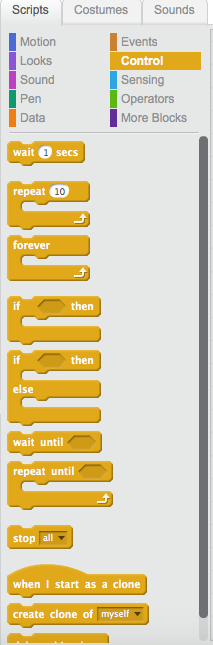
4.Control section
Control section is for controlling the script. you cant making any game without control section.
in the control section you can change background, repeat your script and many more


Control section


Okay thats all i can write, in my next blog i will making tutorial for making game. i will make the part 2 after the tutorial, okay, see you next time

Kamis, 31 Agustus 2017

What is scratch


   Welcome to my blog, my name is sidqi, in this blog, i will explaining about Scratch.


Scratch is a free education programming language for people that want to learn about programming. Scratch developed by MIT (Massachusetts Institute of Technology) with over 15 million users and 22 million shared projects. The newest version of Scratch is 2.0, you can download this app in scratch.mit.edu.


Scratch is designed to be a easy learning progamming language, you can make anything by your own imagination. Scratch can be used for making game, story and art. scratch using a block based programming and scratch has its own paint editor and sound editor
                                                                         this is scratch


The scratch users can making game just by dragging a block like in that picture so the character can move. the character can move by the block


this is script


this is sprite


okay, that all from me, thanks to reading my blog, see you next time in my next blog